The lobby user's home screen is the everyday tool at reception: it shows today's expected visitors and everyone currently signed in at a glance, and lets you sign in a walk-in visitor on the spot. This article walks through the three sections on the home screen.
Expected visitors today
This list shows every visit booked for today that hasn't been signed in yet. When a visitor arrives:
- Find the visitor in the list by name or host.
- Choose Sign in, notify and print from the row's action menu — this signs the visitor in, notifies the host of their arrival, and prints the visitor badge in one go. Press the small arrow down to choose other options (see picture)
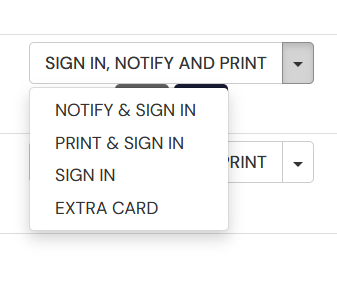
- Open the row's info button beneath sign in options if you need more details about the visit, or remove the visit entirely with the X button.
Visitors currently on site
This section shows everyone who is currently signed in. If a visitor leaves without using the self-service kiosk or a virtual visitor badge to sign out, you can sign them out yourself with the row's Sign out button.
Register a new visit
If a visitor arrives without a booking, you can register the whole visit directly from the home screen: choose the location under Select location, then search for or create the visitor the same way as on the New visit and sign-in page. That way you don't need to send the visitor to a separate page — everything happens from one screen.
Good to know
It's worth keeping all three sections open throughout the day — they update automatically as visitors arrive and leave.
That's it — the whole day at reception, handled from one screen.
Was this article helpful?
That’s Great!
Thank you for your feedback
Sorry! We couldn't be helpful
Thank you for your feedback
Feedback sent
We appreciate your effort and will try to fix the article